
Service Fees
- Senior Scientist $90
- Analyst $68
- Senior Scientist-Non Member $99
- Analyst-Non member $75
- Consulting Services $60
Resource Form
RBI Resource Form Instructions
(Note that the headings below are in signing order.)
Sender
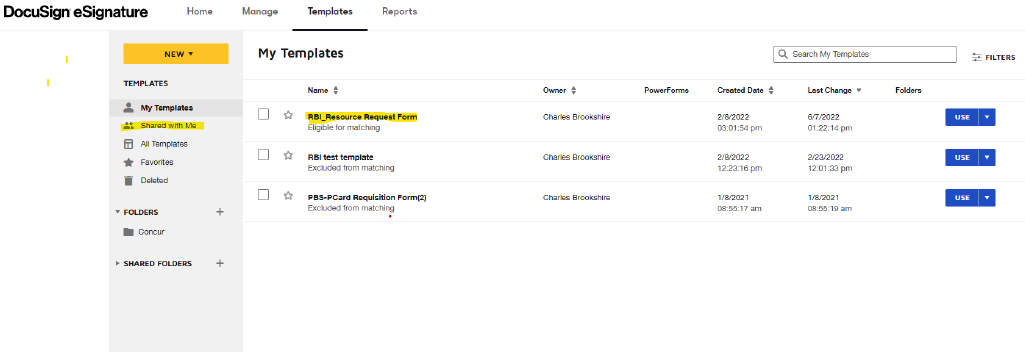
You will find the form under the template section at the top of the screen in DocuSign (https://esignature.gatech.edu/) when you log in labeled “Shared Folders> employees>Facilities> Renewable Bioproducts Institute.”
The form (template) name is RBI_Resource Request Form.
You, the sender, will use your gtAccount@gatech.edu email address(es) for login and recipients using the DocuSign address book like below:

You will use the dialog labeled “Supervisor” to add your supervisor to the form also using the DS address book. Then click the send button at the bottom of the form to send it to you supervisor.
Supervisor
Supervisor is the second person in the signing list.
You will navigate to the appropriate resource section to request resources for the Sender.
These resources may include carrels/office, Buzz card access, keys to office or labs. Once you have selected the resources needed click the “Sign” at the bottom of the first page and then “Finish” in the Blue area at the top of the page to send the document to a reviewer.
Reviewer
The RBI team member will review the form for accuracy as “reviewer” and sign in the reviewer section at the bottom of the first page if there are no corrections. Then click “finish” to have the form go to the approver.
Approver
The “approver” will review the resources requested and sign the bottom of the first page approving allocation of the resources. Then click finish to have the form continue to the” RBI Facilities group.”
RBI Facilities Group
The RBI Facilities Group will then provide the resource as requested. This ranges from carrel/office assignment, Buzzcard access and key assignments. Once resources are ready to give to the user, the RBI Facilities Group member will sign the form next to the resource given. Then click finish to have the completed form sent to the sender, archive and the storage group.
Please note that at any time in the process you may look in your Docusign inbox to see the progress of your form. If the form hasn’t made progress after two business days, you may choose to click the “Resend” button to have the envelope send to that person to remind them to take action. The form will only go the user that in next in the signing order
If you have issues with the form, please email facilities.request@rbi.gatech.edu
[This form was created by Charles Brookshire and is maintained by the Renewable Bioproducts Institute.]